Case study
Khonsu Tech
Retail Operations Platform
A custom-built platform designed to simplify and connect the daily operations of a retail business.
- Category
- Web & Mobile Applications
- Classification
- Internal Business Platform
- Industry
- Retail & Commerce
- Built with
- React · Installable web app (PWA) · Firebase
The challenge
A busy counter, run across too many tools.
- Sales, stock, supplier orders, consignment, cash and staff time lived in separate tools and spreadsheets.
- Cash had to be tracked and reconciled by hand, with no single running figure for the drawer.
- Handsets are high-value, so stock needed to be visible unit by unit, not just as a count.
- Daily tasks like counts, deliveries and closing checks depended on people remembering them.
- There was no live view of how the day’s sales were tracking against target.
- The counter has to keep selling even when the internet connection drops.
The solution
One system for the counter and the back office.
We designed Khonsu Tech around how the counter actually works. A sale starts with a scan, every handset is tracked by its IMEI, and payments can be cash, e-wallet, card, or split across two.
Behind the counter, the same system runs inventory and stock counts, supplier orders and deliveries, the cash drawer, and staff schedules, timesheets, and payroll. Staff and admins each see what their role needs.
It's live at the store counter, replacing spreadsheets and disconnected tools.
The product
Four screens from a working day.
Screens shown with sample data. No real staff, customers, sales or stock.
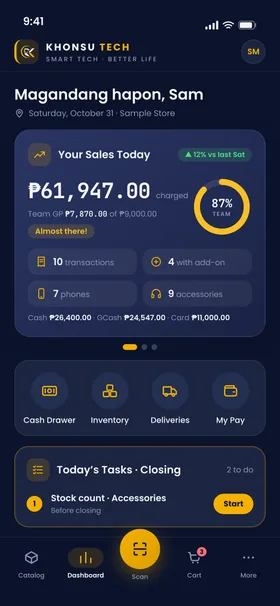
01Dashboard
Today's sales against the team target, the shortcuts staff use most, and the tasks due before closing.
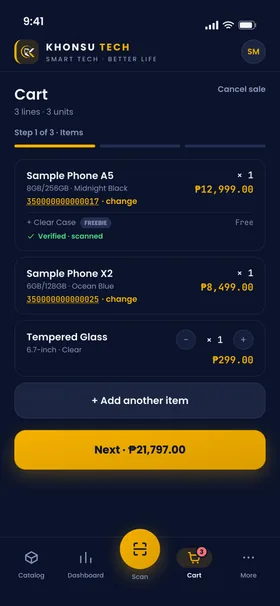
02Sales & POS
A sale in progress. Every handset carries its own IMEI, and freebies are scanned to confirm the box leaving the counter.
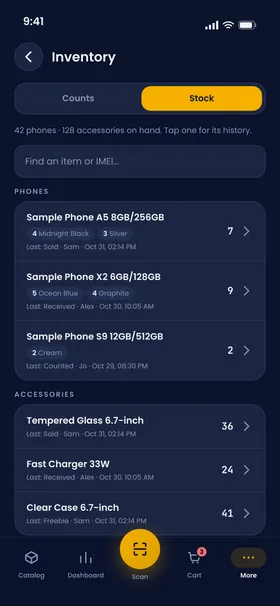
03Inventory
What is on the shelf now, by model and colour, with the last change to each item and who made it.
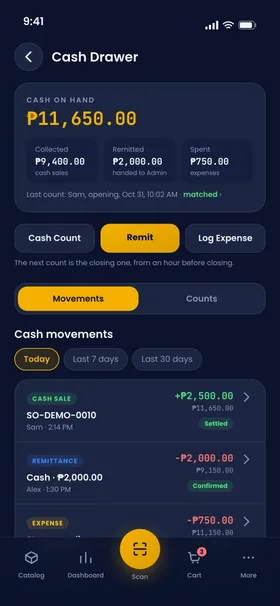
04Cash Management
The drawer as one running balance: cash sales in, remittances and expenses out, and every count recorded.
What it does
Key capabilities
All implemented and in daily use
Sales Operations
In useScan a barcode or IMEI to start a sale, take cash, e-wallet or card payments or split one across two, and handle pre-orders and promoter sales.
Inventory Management
In useUnit-level IMEI tracking from purchase order to receiving to sale, stock counts reviewed and settled by the admin, and a history for every item.
Cash Management
In useOpening and closing drawer counts, remittances, expenses and a payment ledger, so cash on hand is always one known figure.
Staff Workflows
In useSchedules, clock-in and timesheets, leave requests, payroll, and a daily task list, with separate staff and admin views.
Operational Reporting
In useSales, staff, product and promoter reports for the admin, alongside daily targets on the dashboard.
Engineering
Built to keep a shop running.
Architecture
An installable web app (PWA) built in React, designed mobile-first for the phones staff already carry.
Data management
Local-first: the app keeps working offline and syncs to the cloud when the connection returns. Sales, payments and stock movements are voided, never deleted, so the history stays intact.
Access & permissions
Separate roles for staff, admin and promoters. Access rules are enforced on the server, not just hidden in the interface, and covered by an automated test suite.
Security
Separate development and production environments, so testing never touches live data. Credentials stay out of the code.
Maintainability
Shared components and design tokens across every screen, and automated tests for the parts that must never be wrong, such as payroll and schedules.
What it shows
Understanding how a business really runs, then turning it into software people rely on every day.